

4 interest-free installments with Affirm.
Free standard shipping.
30-day return policy. Try Clicks risk-free.
1-year warranty with all Clicks Keyboards.
Free standard shipping.
30-day return policy. Try Clicks risk-free
1-year warranty with all Clicks devices.
Based on 5,000+ reviews.

Your phone is better with buttons.

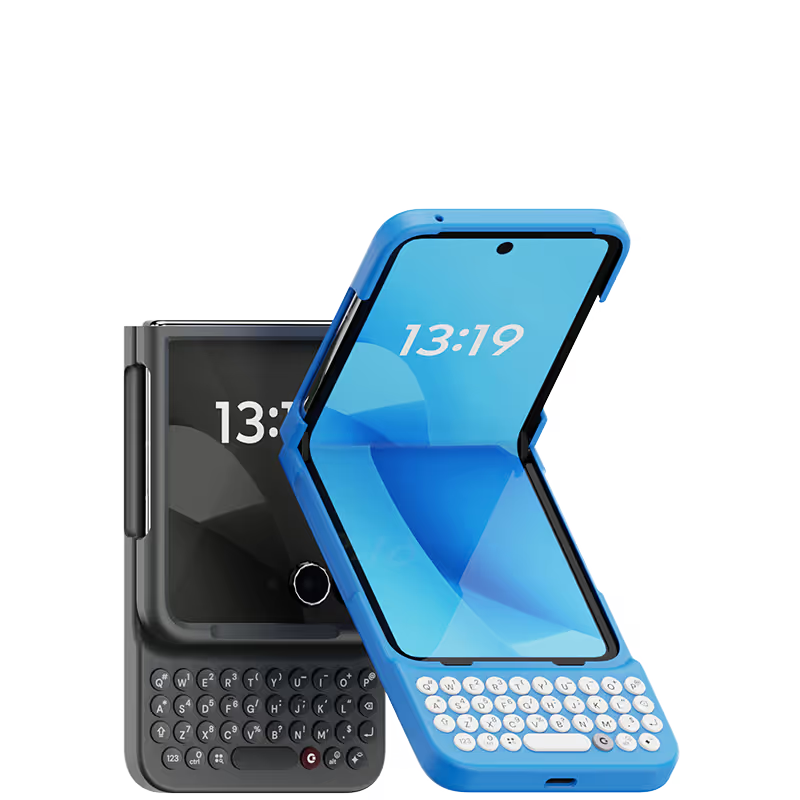
Premium, protective case that gives your phone superpowers.
Now available for Pixel, Razr, & Galaxy.

30 Day Test Drive
Free Shipping
1 Year Warranty
Learn more

5 Reasons Why You'll Love Clicks.

1.

Feel satisfying real buttons
Pressing real buttons and hearing that little clicking sound feels more natural and rewarding.

2.

Elevated premium protection
Brushed metal side keys, a microfibre lining, and a new enclosure that feels great while adding protection inside and out.

3.

See more screen
Free your screen, with 50% more usable display to work, play, surf, chat and engage with your content.

4.

Take action, faster
Launch customized shortcuts to Google apps and Gemini at the push of a button.

5.

Keep your laptop at home
Make more happen right from your phone without needing to crack open your laptop. 

Unlock Powerful Productivity.

A smarter way to work and connect, at your fingertips.

Premium, Protective Design

Charge As Normal

Backlit Keys

Shop Clicks Keyboards.

Select your color.
Onyx
$139
US$159
Shipping date metafield text.
Add to cart
Out of stock
Leave your email to be notified when it's back in stock.
We’ll email you when your selected model is back in stock.
Oops, something went wrong. Try again.
スピーディーな無料配送
追加料金なし
30日間返品保証
リスクなしでClicksをお試しください
80,000台以上を
100ヶ国地域で販売
Select your color.
Clicks for Razr supports Razr+, Razr (2024), Razr 50, Razr 50 Ultra.
Onyx
Electric
$139
US$159
Shipping date metafield text.
Add to cart
Out of stock
Leave your email to be notified when it's back in stock.
We’ll email you when your selected model is back in stock.
Oops, something went wrong. Try again.
スピーディーな無料配送
追加料金なし
30日間返品保証
リスクなしでClicksをお試しください
80,000台以上を
100ヶ国地域で販売
Select your Razr 2025 model.
Select Razr 2025 model & color.
Razr Ultra
For Razr Ultra & Razr 60 Ultra
Razr Plus (2025)
For Razr Plus (2025)
Razr (2025)
For Razr (2025) & Razr 60
Select your color.
Onyx
Electric
$139
US$159
Shipping date metafield text.
Add to cart
Out of stock
Leave your email to be notified when it's back in stock.
We’ll email you when your selected model is back in stock.
Oops, something went wrong. Try again.
スピーディーな無料配送
追加料金なし
30日間返品保証
リスクなしでClicksをお試しください
80,000台以上を
100ヶ国地域で販売
🔥
people are shopping Clicks now.

Buttons with benefits.

Premium Typing Experience

Type with speed and confidence on a real keyboard that provides satisfying tactile feedback.

More Screen

Get 50% more usable display to work, play, surf, chat and engage with your content.

Take Action

Launch apps and control your phone at the push of a button with customizable keyboard shortcuts.

Clicks for Android

Clicks for Android

Clicks has you covered.
Try for 30 days.

It takes a week or two to get used to typing on real buttons –  you’ll need a little bit of patience and perseverance. Trust our tens of thousands of customers, it’s so worth it!

If it’s just not for you, we’ll give you your money back, no questions asked. 

Available for Pixel 9/9 Pro, Razr+ and Galaxy S25
in multiple colors and premium materials.

New
Clicks for Pixel 9/9 Pro, Surge
From
US$139
Buy Now
Add to Cart
New
Clicks for Pixel 9/9 Pro, Onyx
From
US$139
Buy Now
Add to Cart
New
Clicks for Razr 2024
From
US$139
Buy Now
Add to Cart
New
Clicks for Razr 2025
From
US$139
Buy Now
Add to Cart

Shopping for Clicks for iPhone too?

Clicks Keyboards are also available for iPhone 16/15/14.

If you have an iPhone friend who would love Clicks, pick one up for them too! 

Shop Clicks for iPhone

Clicks has you covered.

Free standard shipping
When you buy at Clicks.tech, your Clicks Keyboard will ship next day.
Easy returns
Try Clicks for 30 days. Return it no questions asked.
1-year warranty
We’ll replace your Clicks Keyboard free for one year if there’s a defect.

What Clicks users are saying.

Based on 5,328 user reviews.
Douglas Romeo Falle
Clicks Keyboard for iPhone 15

I purchased Clicks keyboard for Iphone 15 and been using it on my Iphone 16e. It is working on all aspect and very smooth to use. It is easy to use at about 1 week of daily use. The only downside is when using it with Tiktok.

Visit source
Olivia P.
Clicks for iPhone 15 Pro

Forget lugging around a laptop for emails and notes! This Clicks keyboard is my new lifesaver. It connects seamlessly to my iPhone 15 Pro, and the typing experience is fantastic. The keys have a satisfying click and the layout is familiar. No more struggling with the tiny on-screen keyboard!

Visit source
Bradley G.
Clicks for iPhone 14 Pro

The clicks keyboard case is a game changer! I love having a full physical keyboard to be able to type texts, emails, and other communications. The case feels great in the hands and I love being able to program different buttons to trigger different actions! If you miss a physical keyboard on your iPhone, this is the case for you!

Visit source
M ichael K.
Clicks for iPhone 14 Pro

I love the ability to use a physical keyboard again. Easy to attach and detach as needed. The shortcuts are great. Love the backlight customization. Overall meets all my needs and gives me a break from purely digital world. Five stars.

Visit source
Tom K.
Clicks for iPhone 15 Pro

I work on a Mac and use shortcuts extensively. I never expected to be able to use them on my iPhone. It's insane how many shortcuts are in iOS for the iPhone. Who knew?! Clicks basically turned my iPhone into a mobile computer that fits in my hand. Totally changed how I use my iPhone. I never owned a BlackBerry or used a button phone before so it took me a couple weeks to get up to speed on it but now it's weird if I try and go back to using my iPhone without Clicks. Total Clicks convert!

Visit source
Skyler K
Clicks for iPhone 14

I am writing this review with my clicks keyboard on my iPhone 14 Pro. This keyboard has changed everything, love that it gives me more screen with the clicks keyboard. I added a MagSafe adapter to make this phone fully MagSafe compatible with all my accessories. The keyboard has a great tactile feeling when typing and its not about wanting to go back to the old days, its about realising how much a physical keyboard makes your everyday smartphone more useful and productive that only a physical keyboard can offer. I have large hands and I’ve learned to type with my clicks no issues I love the the backlighted keyboard which makes life so much easier! I can not wait for clicks team to build the clicks brand into something even bigger and offer more click products like a case that slides or flips open as I felt the sidekick phone keyboard the most productive of all, being able to flip it out and also having more room to add more buttons for mobile gaming and more productivity and flip it back in to have the phone screen and the keyboard have that extra protection. Clicks has a endless future with there brand name and I hope they have copyrighted the phrase “it just clicks” as all the awesome magnetic accessories from docks to battery banks to mounts, clicks has a bright future. The clicks keyboard gets the attention of someone everywhere I go and it something everyone should have and also start to what more from clicks like myself I think its a sturdy keyboard and should last a long time but the option for extended warranty so never need to worry you’ll be without you clicks keyboard if something happens weather its accidental or its after the 1 year warranty. Clicks please don’t forget the possibility’s of your brand and all the products you can make clicks a household tech brand name its about the future and the versatility of clicks products that just click! Lets get a keyboard that flips,clicks that also can use all the magnetic accessories our phones use already and things you all create that are only something clicks has created to make our phones even more productive and versatile!

Visit source
David E.
Clicks for iPhone 15

Attention, tech enthusiasts and keyboard warriors! Remember the nostalgic days of tactile typing on your mobile phones? The satisfying clickety-clack that accompanied every text message, email, and hastily written note? Relive those moments with Clicks for iPhone, a resurrection of the lost art of physical keyboarding. As a seasoned veteran of the mobile phone scene, I've witnessed the rise and fall of countless trends, but few have intrigued me like Clicks. This ingenious little add-on empowers you to transform your sleek touchscreen iPhone into a pocket-sized productivity powerhouse, enhancing your efficiency on the go. The Clicks keyboard is a marvel of engineering, with well-spaced keys that provide just the right amount of tactile feedback. Typing on it is like typing on a miniature laptop, but without the bulk or the awkward stares from fellow commuters. Sure, it takes a bit of getting used to. My thumbs initially felt like a fish out of water, flopping around in search of their digital home. But after a few days of practice, I was zipping through emails and social media posts with newfound speed and accuracy. And let's remember the sheer joy of hearing that satisfying click with every keystroke. It's a symphony of productivity, a rhythmic reminder that you're getting things done. Of course, there are a few minor quibbles. The Clicks keyboard adds a bit of bulk to your iPhone and makes it longer. But for those of us who prioritize function over fashion, these are minor sacrifices. So, if you're tired of hunting and pecking on your touchscreen keyboard or simply yearning for the tactile typing experience of yesteryear, give Clicks for iPhone a try. Your thumbs will thank you.

Visit source
David V.
Clicks for iPhone 15

i used to work in the cell phone industry and this brings back memories of the first messenger phones. lol. love the keyboard!

Visit source
Takamasa M.
Clicks for iPhone 15

The clicks on the keyboard are comfortable and easy to type and I never press the wrong key at all. I have created 42 keyboard shortcuts using iOS shortcuts and Clicks mode, so most of my work is completed using the keyboard alone. However, when using Japanese, there are many cases where "ー" is used in Japanese words, so a separate key is necessary. Also, it would be very inconvenient if there were not an icon to indicate whether the active input language is Japanese or English. If these two points are improved, I believe that the use of the system among Japanese people will increase significantly.

Visit source
Michael L.
Clicks for iPhone 14 Pro

If you do a lot of typing on your iPhone, this keyboard is a must-have. It's so much easier and more comfortable to type on than the tiny on-screen keyboard. The buttons are well-spaced and have a nice tactile feedback. The keyboard also pairs easily with my iPhone and connects quickly. Overall, I'm very impressed with this product.

Visit source