Clicks Keyboard for iPhone

Push all the
right buttons.

Shop Now
Shop Now
Loved by thousands of fast-typing fingers worldwide.

Take a closer look.

Elevated input.

The best mobile keyboard yet, ergonomically designed to help you type faster, longer and more accurately.

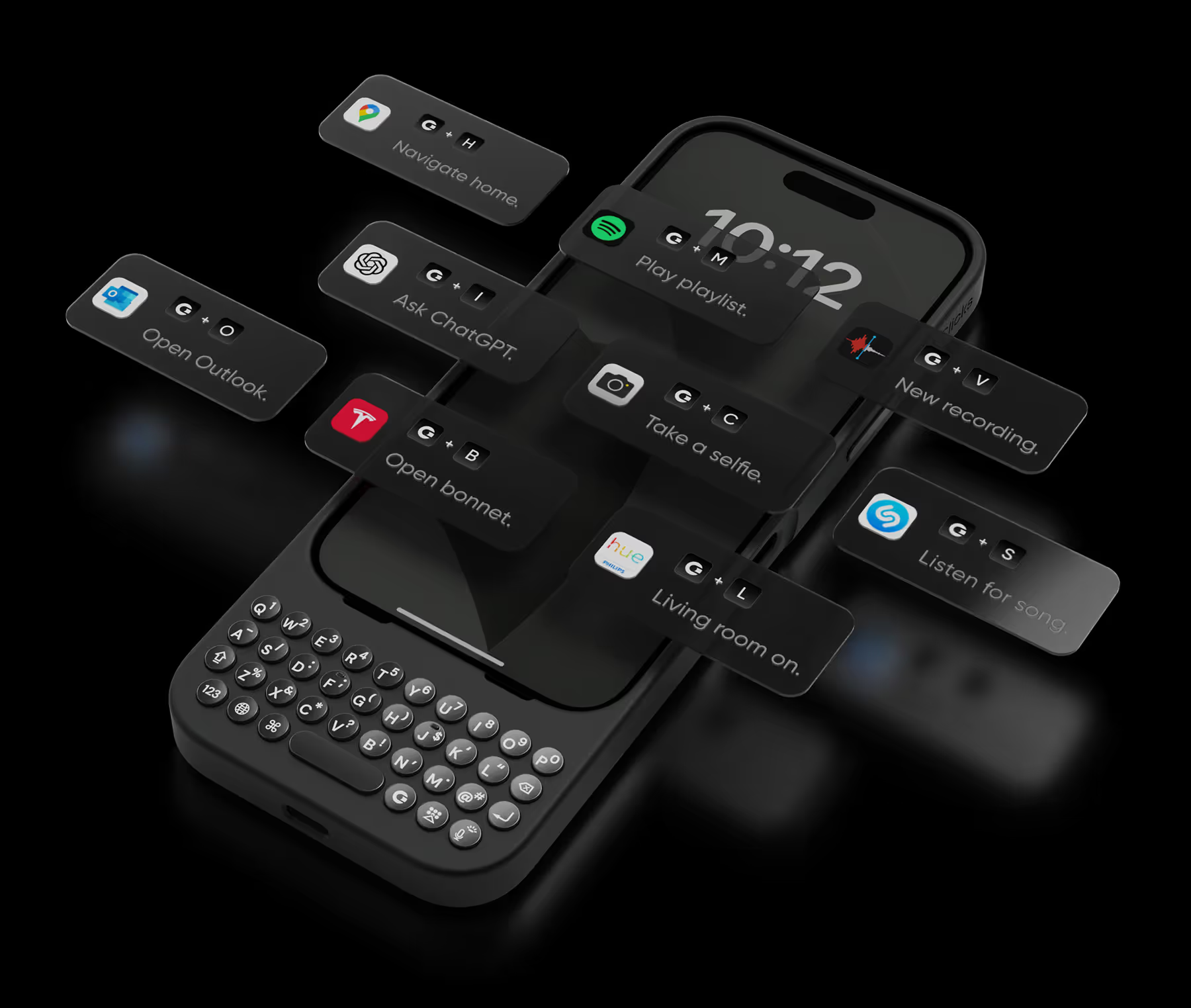
Take action.

Launch Apple Shortcuts at the push of a button. Personalize your keyboard to control your home, take actions, launch apps, and more.
+
T
Open bonnet.
+
L
Living room on.
+
A
Ask ChatGPT.
+
T
Open bonnet.
+
L
Living room on.
+
A
Ask ChatGPT.
+
T
Open bonnet.
+
L
Living room on.
+
A
Ask ChatGPT.
+
S
Listen for song.
+
C
Take a selfie.
+
M
Play emails.
+
S
Listen for song.
+
C
Take a selfie.
+
M
Play emails.
+
S
Listen for song.
+
C
Take a selfie.
+
M
Play emails.
+
V
Record voice.
+
P
Play playlist.
+
N
Navigate home.
+
V
Record voice.
+
P
Play playlist.
+
N
Navigate home.
+
V
Record voice.
+
P
Play playlist.
+
N
Navigate home.

See more. Say more.

Free your screen, with 50% more usable display to work, play, surf, chat and engage with your content.

Stay connected.

With built in support for MagSafe, USB-C data transfer, and pass through charging, Clicks works with your existing ecosystem.

No light?
No problem.

Backlit keys and customizable keyboard brightness make it easy to burn the midnight oil without losing sight of what you’re saying.

Unlock extra features
with the Clicks app.

The Clicks App for iPhone makes it easy to manage your keyboard settings, unlock new features and keep your Clicks keyboard updated with the latest features.
Adjust backlight settings.
Unlock additional setting controls.
Free software updates.

Clicks has you covered.

Free standard shipping
When you buy at Clicks.tech, your Clicks Keyboard will ship next day.
Easy returns
Try Clicks for 30 days. Return it no questions asked.
1-year warranty
We’ll replace your Clicks Keyboard free for one year if there’s a defect.

What Clicks users are saying.

Based on 5,328 user reviews.
Matthew M.
Clicks for iPhone 15

Great implementation of concept. Addition of cursor mode is a huge leap in usability —- looking forward to continued updates. For those wishing to use for programming or IT, note that it cannot type +, *, or _ keys from hardware keyboard

Visit source
Marcos A.
Clicks for iPhone 15

My phone became too big and I couldn’t put in my pocket. The keyboard actually does a clicking sound but after a while it’s too loud, it could be more of a soft typing. The lights of the keyboard go off all the time and when it’s dark I have to press any button to turn it on then start typing which I wish it detected that I’m about to start typing so I can see the keyboard. Rather than that it was good. It takes give you more screen and more precise typing but than the space it gives to the screen its takes from the size of the phone. I prefer having a smaller size phone without the big keyboard.

Visit source
Greg T.
Clicks for iPhone 16 Pro

it took some getting used to, but it’s well worth it. I enjoy my Clicks!

Visit source
Andreas P.
Clicks for iPhone 15

I have been using the Clicks keyboard for almost a year now, and it has changed my life. It's smart, well conceived and really changes the way you interact with your iPhone.

Visit source
André B.
Clicks for iPhone 15

I have enjoyed using the Clicks "Precision Typing Instrument" immensely - Typing and browsing with "Clicks" is so much more satisfying than typing on glass. It's also beautiful, well built and fits my Iphone 15 perfectly.

Visit source
Andri Tamba
Clicks Keyboard for iPhone 16

Overall, my experience with the Clicks Technology device has been good. It brings back the nostalgia of the BlackBerry days with its accuracy and fantastic tactile feel — typing is smooth, responsive, and very enjoyable. On the positive side, the keyboard makes long typing sessions easier and more precise. However, since I’m using it with the iPhone Pro Max 16, the overall length is quite a bit longer, which took me about two weeks to get fully comfortable with. The size also makes it a little tricky to fit into pockets easily. In short: Pros: Excellent typing accuracy, tactile feedback, nostalgic BlackBerry-like experience. Cons: Larger size on Pro Max 16 takes adjustment, not pocket-friendly.

Visit source
Antonio M
Clicks for iPhone 14 Pro - Founders Edition

Having a keyboard again to maximize the screen is absolutely essential. Felt programmed for years to think otherwise. Couldn't be more grateful for this to be in my hands.

Visit source
Vergil I.
Clicks for iPhone 15

I thought it was gonna be easy like learning to ride a bike again. I was wrong, but it takes a little more time to get used to physical keyboards again.

Visit source
Michael T.
Clicks for iPhone 15 Pro

I was looking for a way to type more easily on my iPhone, and this Clicks keyboard is perfect. It's exactly what I needed. The keyboard is well-made and feels like it will last a long time. I'm very happy with this purchase.

Visit source
Eric Flesche
Clicks Keyboard for iPhone 16

The keyboard is back! Now I can use my phone for business again.

Visit source

Explore other Clicks models.

Clicks for iPhone 15
Available for iPhone 15, Pro, Pro Max, and Plus models in four great colors - London Sky, Royal Ink, BumbleBee, Miami Beach.
Buy Now
Clicks for iPhone 14
Available for Pro and Pro Max models in two great colors - London Sky, BumbleBee.
Buy Now