Black Friday ends soon! Save up to 63%!
Shop now

Clicks Keyboard for iPhone

Your iPhone is better with buttons.

Buy Now
Buy Now
Loved by thousands of fast-typing fingers worldwide.

Shop Clicks Keyboards.

Select your iPhone 17 model.
Select iPhone model & color.
iPhone 17 Pro
iPhone 17 Pro Max
iPhone 17
Select your color.
Onyx
Smoke
$139
US$159
Shipping date metafield text.
Add to cart
Out of stock
Leave your email to be notified when it's back in stock.
We’ll email you when your selected model is back in stock.
Oops, something went wrong. Try again.
Fall savings promo - our largest sale yet!
Available while quantities last.
Select your iPhone 16 model.
Select iPhone model & color.
iPhone 16 Pro
iPhone 16 Pro Max
iPhone 16
iPhone 16 Plus
iPhone 16e
Select your color.
Onyx
Spice
Surf
Royal Ink
Miami Beach
$139
US$159
Shipping date metafield text.
Add to cart
Out of stock
Leave your email to be notified when it's back in stock.
We’ll email you when your selected model is back in stock.
Oops, something went wrong. Try again.
Fall savings promo - our largest sale yet!
Available while quantities last.
Select your iPhone 15 model.
Select iPhone 15 model & color.
iPhone 15 Pro
iPhone 15 Pro Max
iPhone 15
iPhone 15 Plus
Select the color of your Clicks.
London Sky
BumbleBee
Royal Ink
Miami Beach
$139
US$159
Shipping date metafield text.
Add to cart
Out of stock
Leave your email to be notified when it's back in stock.
We’ll email you when your selected model is back in stock.
Oops, something went wrong. Try again.
Looking for regional keyboard layouts? Check out QWERTZAZERTY.
Select your iPhone 14 model.
Select iPhone 14 model & color.
iPhone 14 Pro
iPhone 14 Pro Max
Select the color of your Clicks.
London Sky
BumbleBee
$139
US$159
Almost gone - order now!
Add to cart
Out of stock
Leave your email to be notified when it's back in stock.
We’ll email you when your selected model is back in stock.
Oops, something went wrong. Try again.
🔥
people are shopping Clicks now.

Take a closer look.

Elevated input.

The best mobile keyboard yet, ergonomically designed to help you type faster, longer and more accurately.

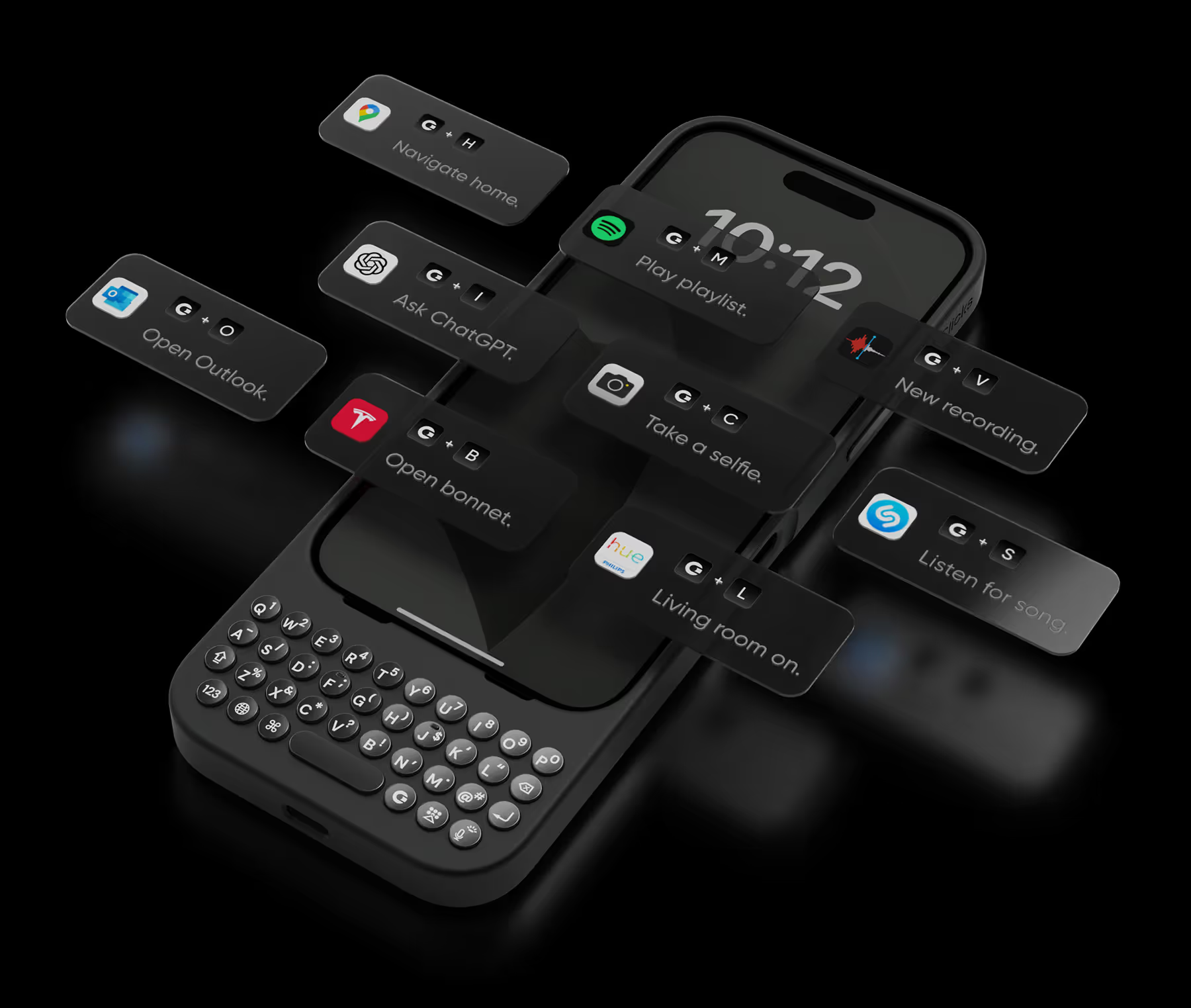
Take action.

Launch Apple Shortcuts at the push of a button. Personalize your keyboard to control your home, take actions, launch apps, and more.
+
T
Open bonnet.
+
L
Living room on.
+
A
Ask ChatGPT.
+
T
Open bonnet.
+
L
Living room on.
+
A
Ask ChatGPT.
+
T
Open bonnet.
+
L
Living room on.
+
A
Ask ChatGPT.
+
S
Listen for song.
+
C
Take a selfie.
+
M
Play emails.
+
S
Listen for song.
+
C
Take a selfie.
+
M
Play emails.
+
S
Listen for song.
+
C
Take a selfie.
+
M
Play emails.
+
V
Record voice.
+
P
Play playlist.
+
N
Navigate home.
+
V
Record voice.
+
P
Play playlist.
+
N
Navigate home.
+
V
Record voice.
+
P
Play playlist.
+
N
Navigate home.

See more. Say more.

Free your screen, with 50% more usable display to work, play, surf, chat and engage with your content.

Stay connected.

With built in support for MagSafe, USB-C data transfer, and pass through charging, Clicks works with your existing ecosystem.

No light?
No problem.

Backlit keys and customizable keyboard brightness make it easy to burn the midnight oil without losing sight of what you’re saying.

Unlock extra features
with the Clicks app.

The Clicks App for iPhone makes it easy to manage your keyboard settings, unlock new features and keep your Clicks keyboard updated with the latest features.
Adjust backlight settings.
Unlock additional setting controls.
Free software updates.

Clicks has you covered.

Free standard shipping
When you buy at Clicks.tech, your Clicks Keyboard will ship next day.
Easy returns
Try Clicks for 30 days. Return it no questions asked.
1-year warranty
We’ll replace your Clicks Keyboard free for one year if there’s a defect.

Compare Clicks Keyboard models.

Clicks Keyboard for iPhone 16

Clicks Keyboard for iPhone 15

Clicks Keyboard for iPhone 14

Premium Keyboard Experience
Backlit Keyboard
Clicks Mode
MagSafe Compatible
New Ergonomic Sculpted Keys
USB-C Data Mode
Models Supported
16 Pro Max
16 Pro
16 Plus (coming soon)
16 (coming soon)
15 Pro Max
15 Pro
15 Plus
15
14 Pro Max
14 Pro
Connectivity
USB-C (Charging + Data)
USB-C (Charging)
Lightning (Charging + Data)
Colors

What Clicks users are saying.

Based on 5,328 user reviews.
Sunphill Sin
Clicks Keyboard for iPhone 15

Clicking gives me fun of typing and bigger screen use also help me working more efficiently

Visit source
Barb Jones
Clicks Keyboard for iPhone 15 plus

The phone case is great especially with the keyboard. I did have a problem where mine stopped working I contacted them and it was under warranty for at least a year and it was under a year old and they were great. They were very responsive their small company so you have to be patient but they will get back with you via email but it’s a great little keyboard case it’s a little big obviously but it’s nice cause you get your whole screen and the ability to use a regular keyboard instead of a virtual very pleased with this company and I would recommend this product to anybody that wants a standard keyboard

Visit source
Andrew P.
Clicks for iPhone 14 Pro

Solid experience, took some getting used to (like any phone keyboard) but quickly became very efficient with typing. Received multiple comments: (1) Flight boarding - wow and had never seen before; (2) Apple Store - buying a new watch and genius desk loved the form; (3) Auto Dealer - test driving a car - took a photo for her family (missed physical keyboard). Did not buy for attention, but a super positive benefit!

Visit source
Nigel Green
Clicks Keyboard for iPhone 16

Typing on the iPhone is no longer a chore with the Clicks keyboard. Keyboard shortcuts are also excellent. I contacted support with a technical question and they responded within 5 minutes answering my query. For me this is a must have accessory from a great company.

Visit source
Douglas Romeo Falle
Clicks Keyboard for iPhone 15

I purchased Clicks keyboard for Iphone 15 and been using it on my Iphone 16e. It is working on all aspect and very smooth to use. It is easy to use at about 1 week of daily use. The only downside is when using it with Tiktok.

Visit source
Alexandra M.
Clicks for iPhone 15 Pro

I can't express how much I love using the "Clicks" keyboard attachment for my iPhone! As someone who types a lot on my phone, the tactile feedback of physical keys has been a game-changer. The "Clicks" keyboard seamlessly integrates with my iPhone and it is ready to use. However, what sets "Clicks" apart is its convenience. It attaches effortlessly to my iPhone, and I can easily carry it with me wherever I go. Whether I'm typing emails, working on documents, or chatting with friends, the "Clicks" keyboard has significantly improved my productivity and typing experience. I also appreciate the thoughtful design of "Clicks". It looks sleek and modern, complementing the aesthetics of my iPhone and the battery life is impressive, lasting through long typing sessions without needing a charge Overall, "Clicks" has made my iPhone more versatile and enjoyable to use. It's a must-have accessory for anyone who values efficiency and comfort in their mobile typing experience. I wholeheartedly recommend "Clicks" to all iPhone users!

Visit source
Michael T.
Clicks for iPhone 15 Pro

I was looking for a way to type more easily on my iPhone, and this Clicks keyboard is perfect. It's exactly what I needed. The keyboard is well-made and feels like it will last a long time. I'm very happy with this purchase.

Visit source
Pascale B.
Clicks for iPhone 15

As a diehard blackberry user, Clicks is the only thing that can make me use an iPhone. The experience is fantastic.

Visit source
Olivia N.
Clicks for iPhone 15 Pro

I'm a freelance writer, and this keyboard has been a game-changer for my mobile productivity. No more typos or struggling with the tiny on-screen keyboard. The Clicks keyboard lets me write long emails and documents with ease. It's a lifesaver!

Visit source
Eden Orbino
Clicks Keyboard for Razr 2025

Having this and switching to the Razr has been a game changer for my productivity. I love this keyboard so much I decided to mod it to be able to have a protective hinge mechanism for my phone as seen on other cases. I've heard of this keyboard having some connectivity issues from other users, from my understanding it's the fault of Moto's UI of how it interacts with Clicks. I recommend going into settings and making sure the keyboard is set to always running in the background so that if you close any/all tabs on the Razr, the keyboard will remain connected. There's a YouTube video that goes into further details about this. Since troubleshooting this issue as soon as I've received my case, I have not faced such problems.

Visit source