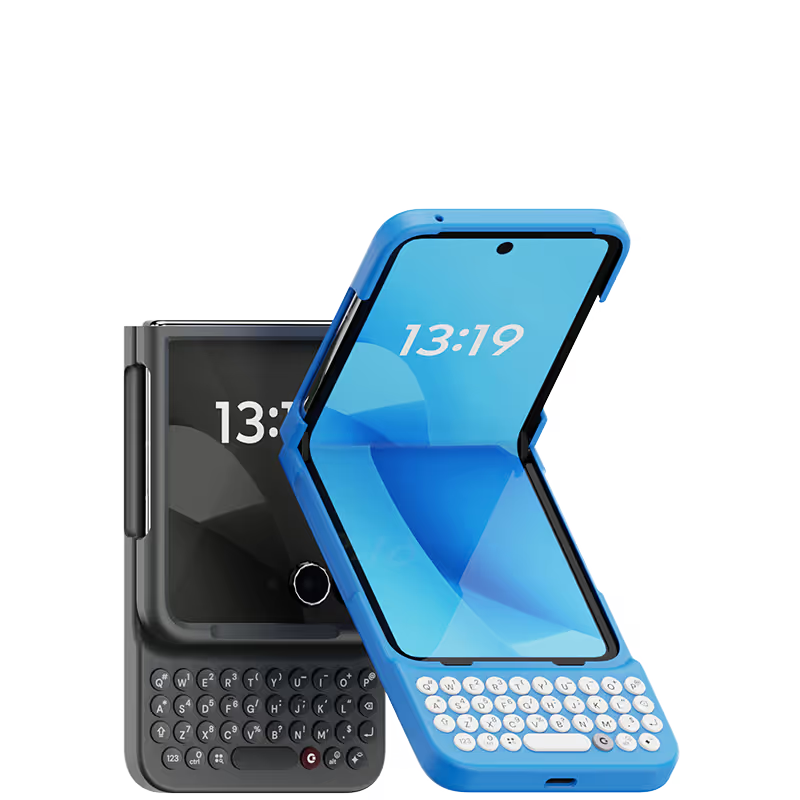
As a die-hard fan of physical keyboards, I was excited when Clicks announced a keyboard for the Motorola Razr 50 Ultra. After using it for a while now, I can honestly say it's everything I hoped for and more. The moment I snapped the keyboard onto my Razr, it felt right. It's like my phone and a classic BlackBerry had a baby—a super modern, foldable, and functional one. The tactile feedback of the keys is phenomenal; they have satisfying, solid click that makes typing feel effortless and precise. I’m flying through emails and messages again, and it feels so much more efficient than tapping on a screen. What I love most is how it frees up the main screen. It's the best of both worlds. The Clicks keyboard isn't just an accessory; it completely changes the Razr 50 Ultra into the ultimate productivity powerhouse for me. If you miss physical keyboards like I do, this is an absolute must-have.
My experience has been excellent. This is a device that those of us who write a lot must have. The teachings from you are very helpful and always ahead, so we can become more skilled each time. The shortcuts and videos are helpful and provide new ideas. I am very grateful and look forward to more.
I really like how user friendly it is Just plug and play
After upgrading my 15 Pro Max, I acquired this case, which has proven to be an invaluable asset. It evokes fond memories of my Blackberry era, and I will continue to use it. The Spice color is particularly aesthetically pleasing.
Using the native iOS shortcuts and setting up custom ones in the Shortcuts is where the real power behind this accessory comes into play. It's also refreshing to have the entire display of my iPhone 15 Pro Max visible, instead of having a pop-up keyboard that consumes a third of the screen. I also hate the default iPhone keyboard, and find third party keyboards to be mostly an exercise in frustration. Lots of lessons have been learned in the process, and the folks at Clicks truly brought their expertise and attention to detail with the design and build of the Clicks Keyboard. It is now an essential accessory for me, and I continue to figure out ways to make it better on a regular basis. If you miss the physical keyboard on devices like the Blackberry, this accessory is well worth the cost.
2000 Stars! I could not be happier with having my buttons back! Took a few days to get used to having a tall phone and mastering the different buttons, but once I did, there's now no stopping me. Everyone that sees my Clicks wants one, and is well, kind of jealous. Worth every penny that I'm thinking of getting an additional color!
So far its been great! I've had it for a few weeks without any issues. There are a handful of small bugs, but the usability of the keyboard had been great! Its fun to have keys and they are extremely clicky and satisfying to use!
As a long-time fan of physical keyboards and a former BlackBerry user, I was thrilled to discover the Clicks keyboard for iPhone. This innovative accessory brings back the tactile typing experience many of us have been missing in the era of touchscreen smartphones. **Design and Compatibility** The Clicks keyboard seamlessly combines the best of both worlds – the versatility of an iPhone with the satisfying feel of a physical keyboard. It's designed to work harmoniously with the iPhone, creating a nostalgic yet modern device that caters to those who crave tactile feedback while typing. **Typing Experience** While my typing speed hasn't significantly increased, I've noticed a marked improvement in accuracy. The physical keys allow for more precise input, reducing the frustration of autocorrect mishaps common with on-screen keyboards. As with any new input method, there is a learning curve, but I've found my proficiency improving week by week. **Standout Features** The most impressive aspect of the Clicks keyboard is its shortcut functionality. The ability to open specific apps directly from the locked screen is a game-changer, especially for users with numerous applications. This feature significantly streamlines the user experience, saving time and reducing the frustration of searching for the right app. **Customization and Accessories** To enhance the Clicks keyboard experience, I've made a couple of modifications: 1. Added a low-cost MagSafe ring to the back for convenient charging. 2. Improvised a holding band to improve grip and typing comfort. These small additions have further improved the usability of the device, making it even more tailored to my needs. **Learning Curve** It's worth noting that adapting to the Clicks keyboard may take a few weeks for some users. However, the investment in time pays off as typing speed and accuracy continue to improve with regular use. **Conclusion** For iPhone users who miss the tactile feedback of physical keyboards, the Clicks keyboard is a dream come true. While it may not dramatically increase typing speed, it offers improved accuracy, fantastic shortcut capabilities, and a nostalgic typing experience. With a bit of patience during the adaptation period, this accessory can significantly enhance your iPhone usage, especially if you're a heavy typer or app user. Reference Photos https://i.ibb.co/fNqRR2v/IMG-0022.jpg https://i.ibb.co/8gGbGzv/IMG-0023.jpg